
Every step from the next article to delivery, in one place.
See what to work on, draft the full article, read the evidence and the quality findings, and decide how an approved version goes out.
Example workspace · Sample content
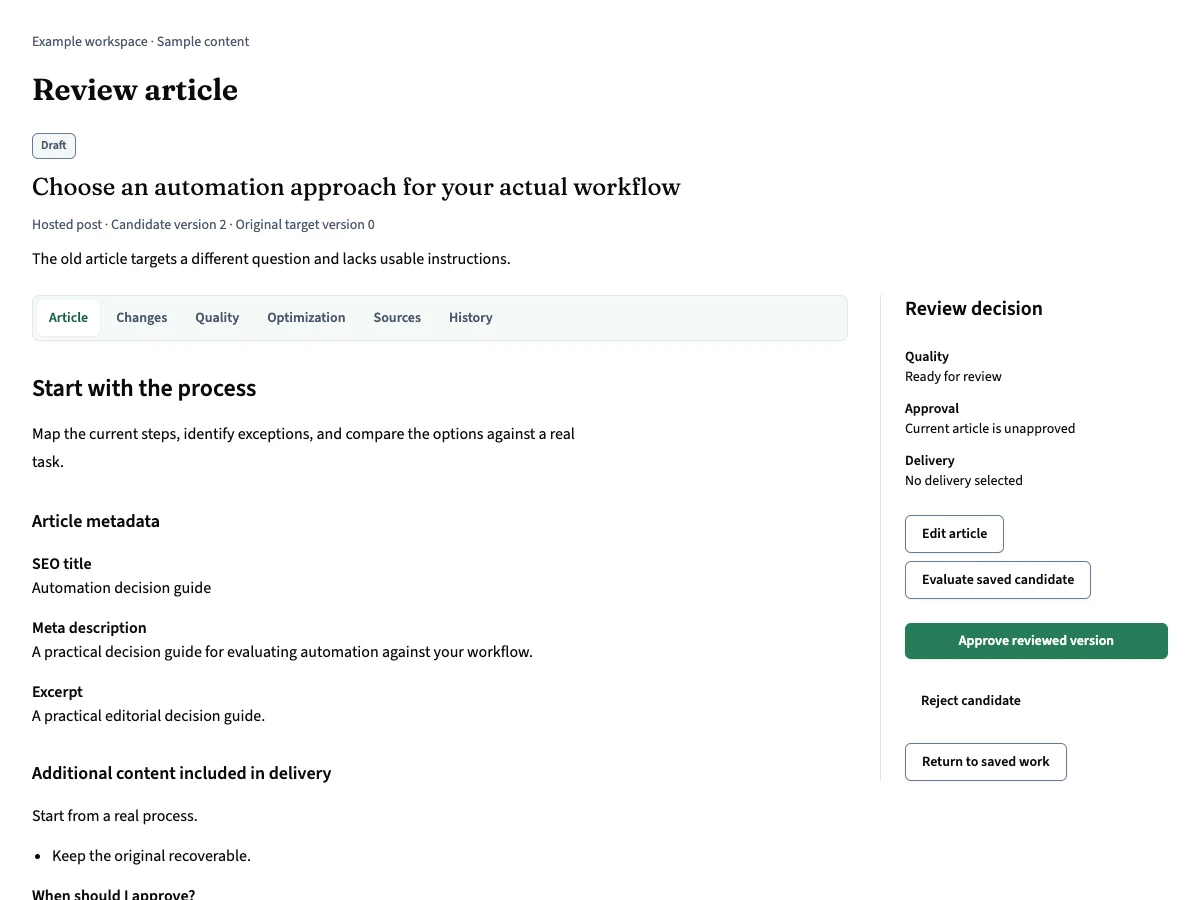
Review the full draft
Sample article, “Choose an automation approach for your actual workflow.” This full draft is unapproved, and no delivery is selected. Read the article, what changed, the quality findings, and the sources.

1. Learn the site
Scan a public page or enter the details yourself, then confirm what the business does.
2. See what to do next
Review recommended next steps, the evidence behind them, what is missing, and a short rolling plan.
3. Draft the full article
Create a new article or improve one you already have, using your brief and sources you have reviewed.
4. Check it before approval
Review facts, structure, readability, and search and AI-answer checks (SEO, GEO, and AEO). These checks do not guarantee rankings or citations.
5. Choose how it goes out
Approve the version you want, then publish it on your hosted blog, pick the earliest time it may go out, or export it for your CMS.
Six parts of the same workflow.
Open the part that matches the work in front of you. The rest stays connected.
Strategy
Decide what is worth writing before a draft starts.
Next actions
See what to improve next, with the evidence and the gaps written down.
A short list of work that is actually supported.
Explore Next actionsSEO, GEO, and AEO checks
Review search intent, evidence, structure, direct answers, readability, and metadata.
You can see the weak spots before you choose delivery.
Explore Quality checksCreation
Draft the article from context you can inspect.
Article creation and improvement
Create a full draft, or improve an article you already have, including the title, structure, body, and metadata.
A full draft you can read before anyone else does.
Explore Create and improveKnowledge Base
Use PDFs, notes, and existing posts as context, and decide which passages may appear in public.
Every public claim can be traced to a source you allowed.
Explore Knowledge BaseImage Generation
Generate a cover and supporting images, then review them before they are attached.
The images on a post are ones you have looked at.
Explore Image GenerationDistribution
Approve a version, then choose hosted publication or export.
Publishing
Publish an approved hosted version, choose the earliest time it may go out, or export it for your CMS.
Approval and delivery stay separate decisions.
Explore PublishingWhat this replaces
Blog Pro Max keeps the article, the sources, and the delivery decision together.
Instead of Keyword sheets
A plan based on your site
Instead of Loose AI chat drafts
A full draft you can review
Instead of Scattered source docs
Sources with a clear permission
Instead of Publishing reminders
Delivery you approve
Add your site and see the next article.
Confirm the business context, then open Next actions. Nothing is published, and automation stays off until you allow it.
Free start. Full workflow. Cancel anytime.