Write from material you already trust.
Add PDFs, notes, and posts you already have. You decide which passages may support a public article. A publication permission is separate from uploading a file, and separate from a page already being public. Missing or private evidence can stop delivery.
Example workspace · Sample content
Inspect the sources
A supporting passage for “Choose an automation approach for your actual workflow,” with its recorded publication permission. Delivery checks the current permission again.

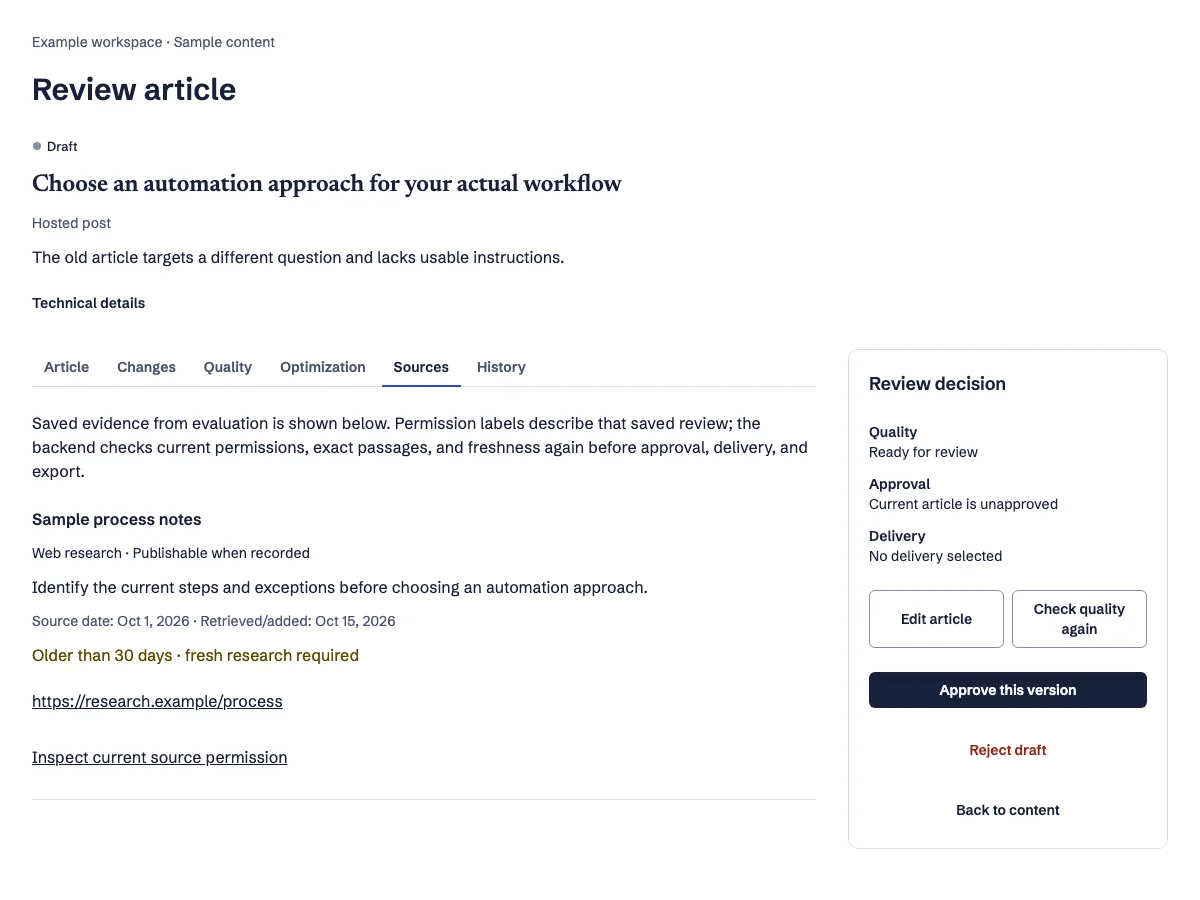
How your sources stay attached to the draft.
- 1
Add PDFs, notes, frameworks, and articles you already published.
- 2
The relevant passages are retrieved before a draft is written or improved.
- 3
Read the exact passages and their current publication permission before anything is delivered.
What you get
- Drafts grounded in your files
- Notes you can reuse
- The passages behind a section
- A publication permission on each passage
Every public claim can be traced to a source you allowed.
- You already have frameworks, decks, or long documents that should shape the article.
- The draft needs to stay specific to your work, with the source still visible.
- You are turning material you already wrote into articles for search.
Works well with
- Create and improveCreate a full draft, or improve an article you already have, including the title, structure, body, and metadata.
- Next actionsSee what to improve next, with the evidence and the gaps written down.
- Quality checksReview search intent, evidence, structure, direct answers, readability, and metadata.
Start with your site, then choose the next action.
Add your website and confirm its context. Import pages or add sources, then choose the work in Next actions. Setup does not turn on automation or publish anything.
Account setup does not purchase a subscription.